Ask for condonation
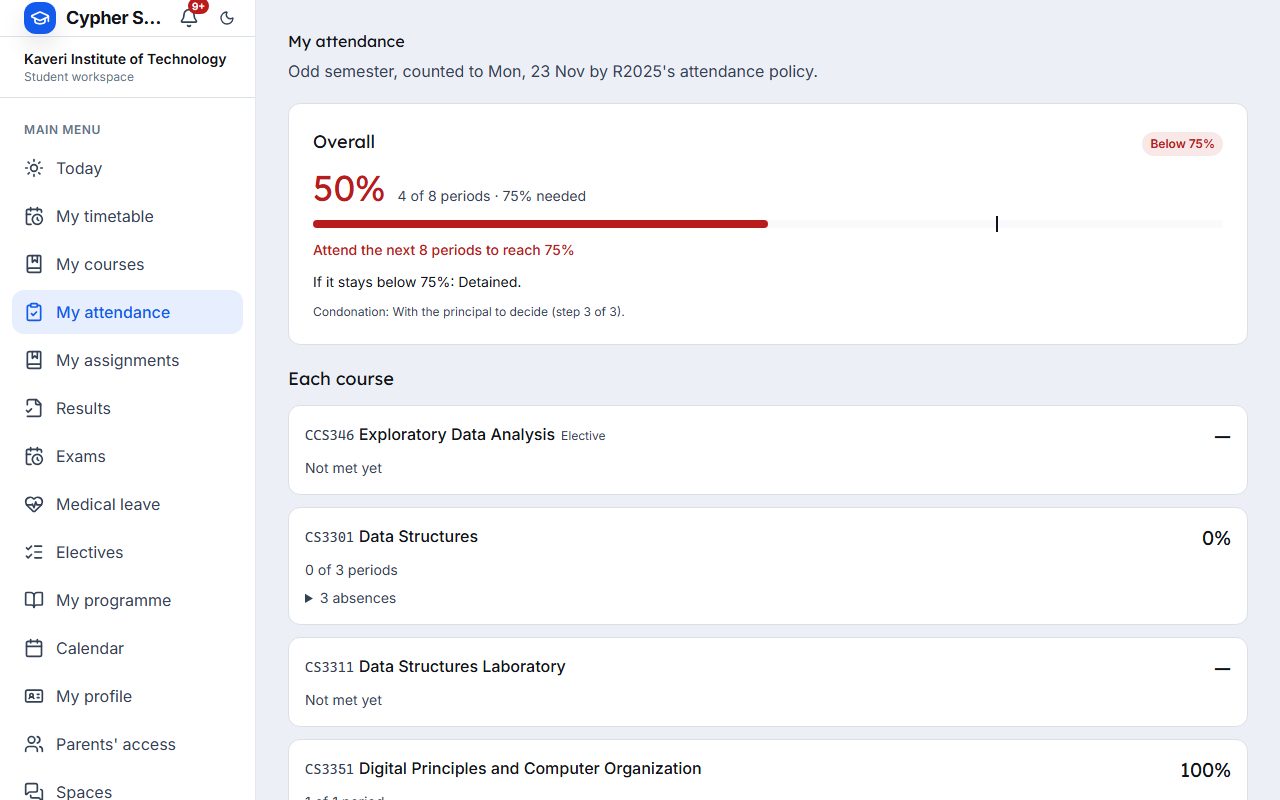
Condonation is approved relief from an attendance shortage. When your attendance is below the line but in the band your regulation calls condonable, you can ask for it yourself. It then goes through the approvals your regulation sets, in order.
Who can do this: students, for their own attendance, overall or in a course, when that scope is in the condonable band and no request for it is open. Your class teacher, mentor or the office can also file it for you.
Before you start
- On My attendance, the scope shows Ask for condonation… only when you can ask. See How your attendance is counted for the bands.
- If your reasons are medical, have the certificate or letter ready as a file under 10 MB.
- If your regulation asks for a condonation fee, pay it as the college tells you and keep the receipt number. The fee isn't collected in the app.
Steps
- In the menu, choose My attendance.
- Under Overall, or under the course, choose Ask for condonation…
- Read the dialog: the scope, your attendance and its band, The steps it goes through in order, and how many times you've been condoned before.
- In Reasons, give the reasons in a sentence or two, for example "Hospitalised with typhoid from 6 to 14 October; the discharge summary is attached."
- If you paid a fee, enter its Fee receipt number.
- Under Certificate or letter, attach your proof, if you have one.
- Choose Ask for condonation.
What happens next
- My attendance shows where it is, for example "Condonation: With the principal to decide (step 3 of 3)."
- Each step is told when it's their turn, and acts in order.
- When it's decided, you're told. If it's approved, the scope shows Condoned.
If something goes wrong
- There's no Ask for condonation… button: the scope isn't in the condonable band, or a request for it is already open or approved.
- "The college's file storage isn't set up yet: the file's name goes with the request, not the file.": show the original to whoever decides.
- Your regulation limits how many times you can be condoned: the dialog says "at most {number} in the programme". Ask your class teacher or the office.